
ZenGrove
Grow a plant, one node at a time.
Grow a plant, one node at a time.
Explore all 45 ZenGrove nodes for Maya with illustrated settings. Shape Cross Section profiles, create multi-way Splits, find properties and build procedural plants.
Curve Input
Collects Maya curves as growth guides. Capture your drawn silhouette, then connect Spline Growth or Spline Segment Growth.
Tree
Curves
Setup

- Curve Collection Name
Gives this tree, collection or output a recognizable name.
- Apply Tree Transform
Off keeps the captured Maya curves in their original world positions. On applies the connected Tree Root's origin and Global Scale. Multiple Tree Root origins do not duplicate the captured curves.
Input
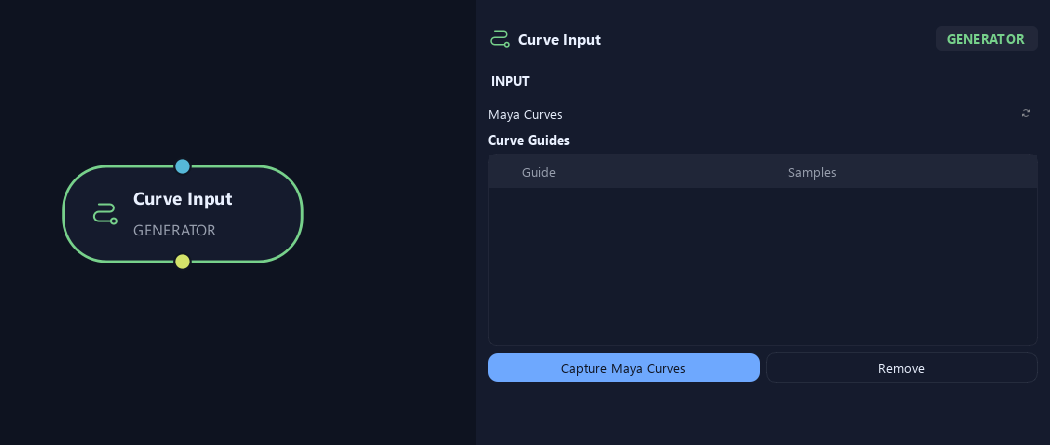
- Maya Curves
Capture Maya Curves adds selected guides. Remove takes selected rows out of the collection. Samples shows how many points were captured per guide.
What is ZenGrove used for?
Explore all 45 ZenGrove nodes for Maya with illustrated settings. Shape Cross Section profiles, create multi-way Splits, find properties and build procedural plants.
Which host application does ZenGrove support?
ZenGrove is built for Autodesk Maya and is distributed through AO Studio Tools.
Where can I download ZenGrove?
Download the current AO Studio Tools package from https://aostudio.tools/getthetools.html and install it through AO.Hub.