AOStudio Tools
Asset browser, library & exchange

Maya Bundle Exchange

Your Maya assets. Ready to find, place and share.

Maya Bundle Exchange is a free Asset Browser and portable asset library for Maya 2025 and 2026. Bring existing MA, MB and FBX files into your library, or save objects and scenes with their dependencies. Organize visual libraries and variants, drag assets into Maya as imports or references, and share self-contained .mbx files.

Free flagshipIncluded with your free accountAutodesk Maya
Maya Bundle Exchange MBX product logo
A home for the assets you make

Build a library you can use in every project.

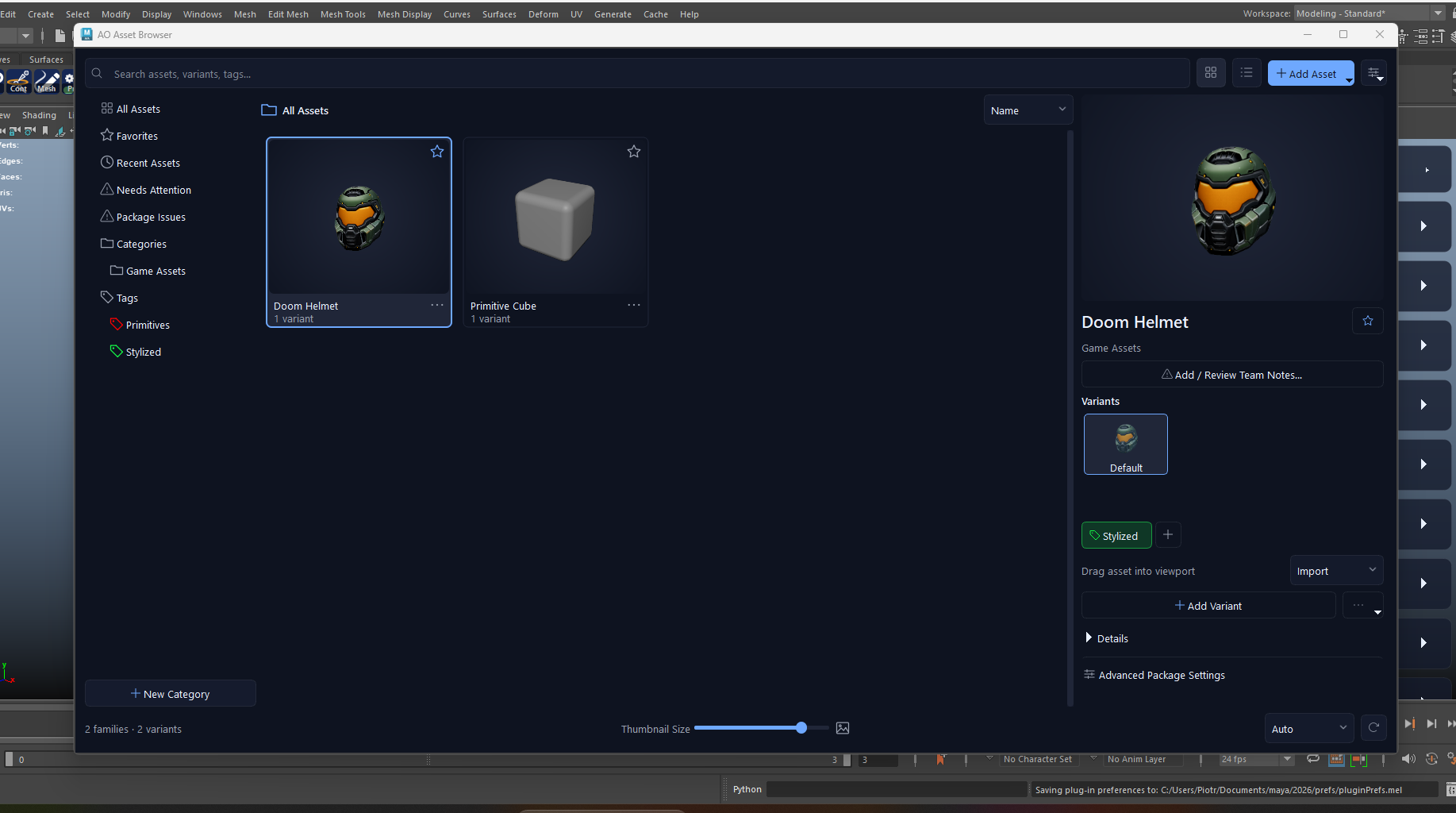
MBX opens straight into the Asset Browser. Find work visually, choose a variant and bring it into Maya. Each asset is backed by a portable package that keeps the scene, its collected resources and its preview together.

AO Asset Browser inside Maya with searchable asset thumbnails, categories, colored tags, favorites, variants and team review notes
Your library inside Maya: browse assets, choose a variant and drag it into the viewport. View full image ↗
01Save selected objects or a complete scene as an asset. Capture a viewport preview or choose an image, then add a name, category, description and tags.
02Bring existing .ma, .mb and .fbx files into the library. Drop selected files onto the browser or scan folders and subfolders, review names and categories, then migrate the checked files into portable MBX assets.
03Browse thumbnails or a detailed list. Search assets, variants and tags; filter by category and return quickly to favorites and recently used assets.
04Keep variations together as one asset family. Choose a named variant, add another from Maya or update the selected variant as your work evolves.
05Import or reference an asset in the current scene. Drag it into the viewport with a placement preview, choose its position and use snapping when needed.
06Organize categories and folders, assign colored tags and edit metadata directly in the browser. Keep a personal library or use a shared library folder.
07Leave team notes on a variant, mark what needs attention and resolve it after changes. Review notes and tag colors are shared through the library folder.
08Collect textures, references, caches, Alembic, USD, audio and other detected dependencies in one .mbx asset. Inspect missing files and portability issues in Advanced Package Settings.
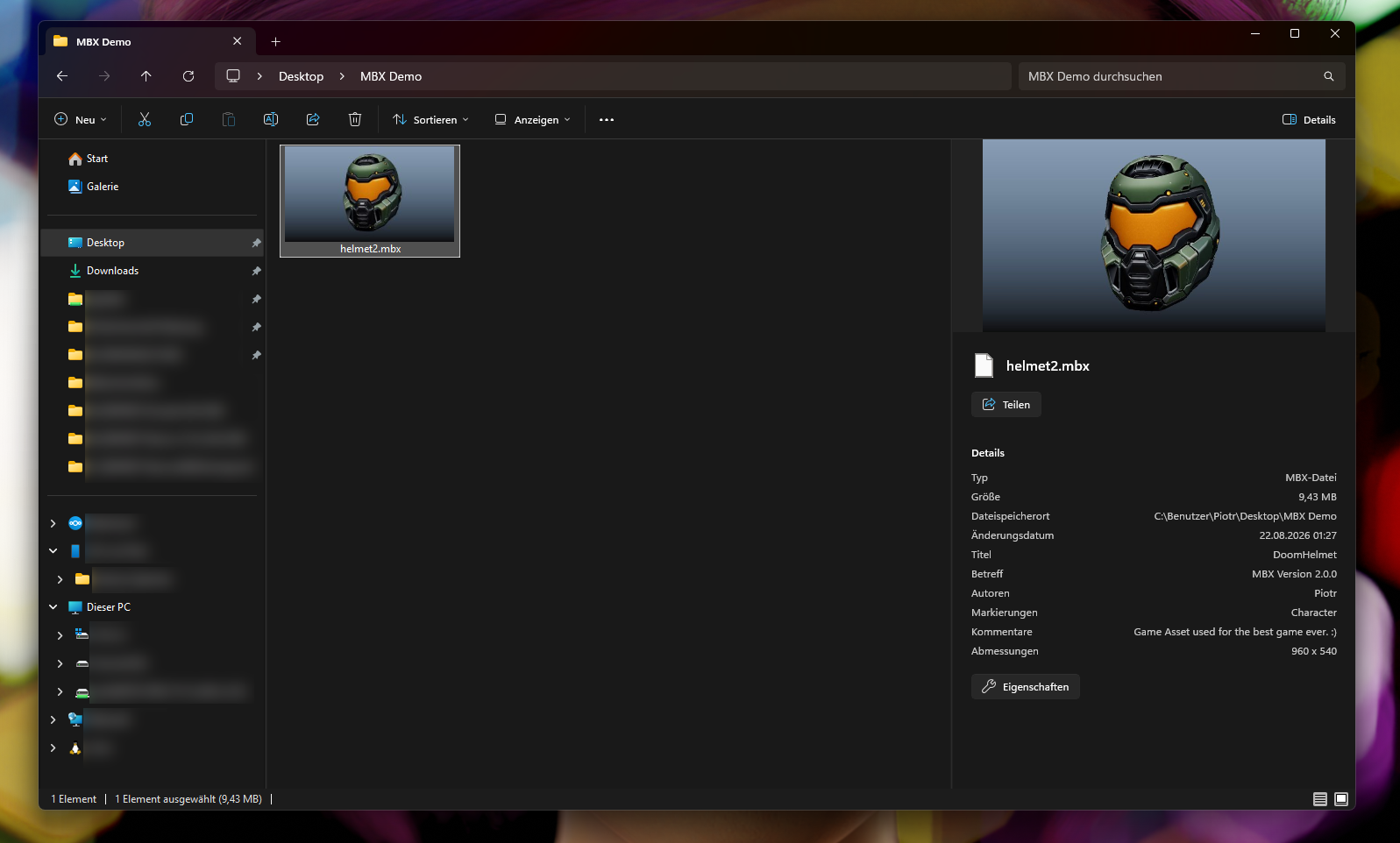
09Recognize .mbx packages in Windows Explorer through embedded thumbnails. Open a package in the Asset Browser or copy it into your library through the Windows integration.

Made for everyday Maya work

From one useful prop to a shared production library.

Bring your existing asset folders

Turn older Maya scenes and FBX collections into a visual MBX library. Convert selected files or a folder in one reviewed batch, with one asset per source file. Originals stay untouched and existing output names are skipped.

Your personal asset shelf

Keep reusable props, characters and scene elements close at hand. Search by name or tag, check the preview and bring an asset back into a new project without searching old scene folders.

Kitbash and scene assembly

Save individual objects from a larger scene. Browse the collection, select a variant and drag it into the viewport. Choose Import for independent scene content or Reference for a Maya reference.

Variations without the folder hunt

Group related versions under one asset family. Compare their previews, switch between named variants and update the one you are working on without losing track of the alternatives.

Shared libraries and team review

Point the browser at a shared folder or NAS library. Use categories and colored tags to keep it readable, then attach a note and a Needs attention marker to the variant that needs another pass.

Workstation and artist handoffs

Export an .mbx file or copy an incoming package into your library. The asset carries its preview, metadata and collected dependencies; MBX restores packaged resources when loading it into Maya.

Archive work you can find again

Store an entire scene as a visual, searchable asset. Inspect its contents and verify package integrity before reuse, or open and unpack it into a Maya project through Advanced Package Settings.

Bring the assets you already have

MA. MB. FBX. One visual library.

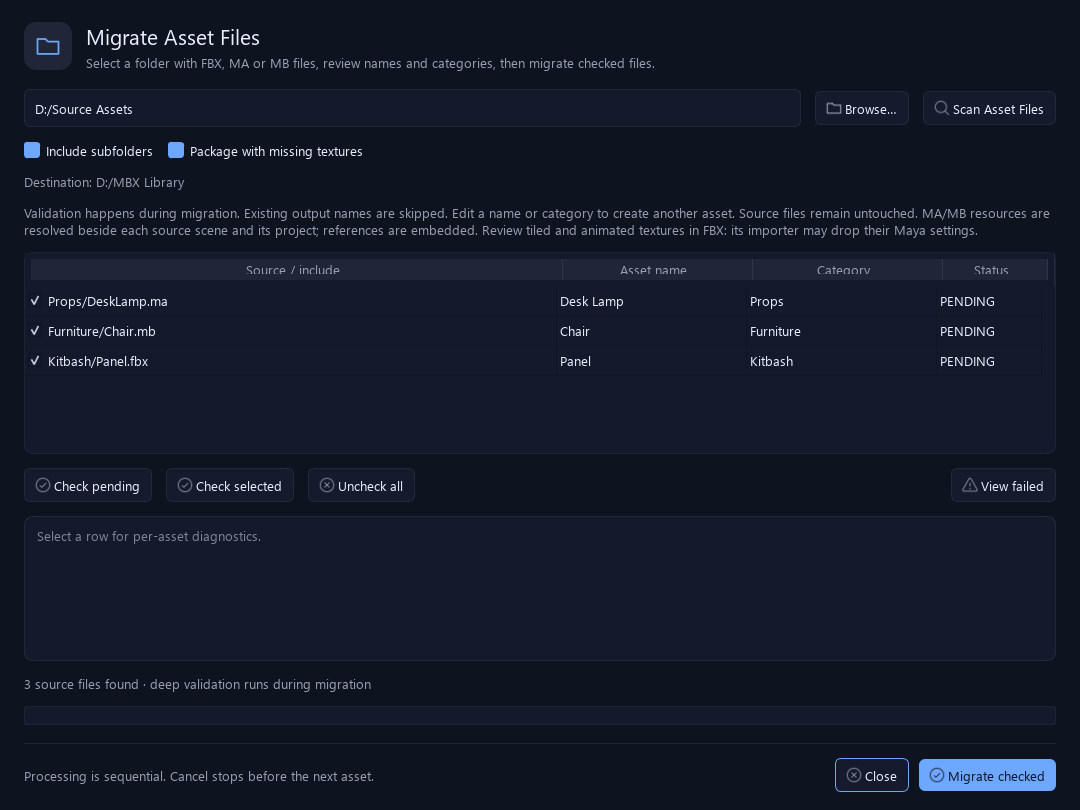
Turn existing Maya scenes and FBX collections into reusable MBX assets. Drop one or several files onto the Asset Browser, or choose Add Asset → Migrate Asset Files… to scan a source folder and its subfolders.

Migrate Asset Files dialog with MA, MB and FBX example rows, editable asset names, categories and include checkboxes
Current MBX dialog with example source files, ready for review before conversion. View full image ↗
Review which files to include, edit asset names and categories, then choose Migrate checked. Each source file becomes one MBX asset with a preview and its collected dependencies.
Source files and your working Maya scene stay untouched. Existing output names are skipped, progress and diagnostics are shown per file, and cancellation stops before the next asset.

MA/MB references are embedded into the converted scene. Review missing textures and FBX material or animation differences in the migration report.

The package behind every asset

Easy to browse. Ready to travel.

The Asset Browser is where you work every day. MBX also gives you a closer look at what an asset contains and makes its preview useful outside Maya.

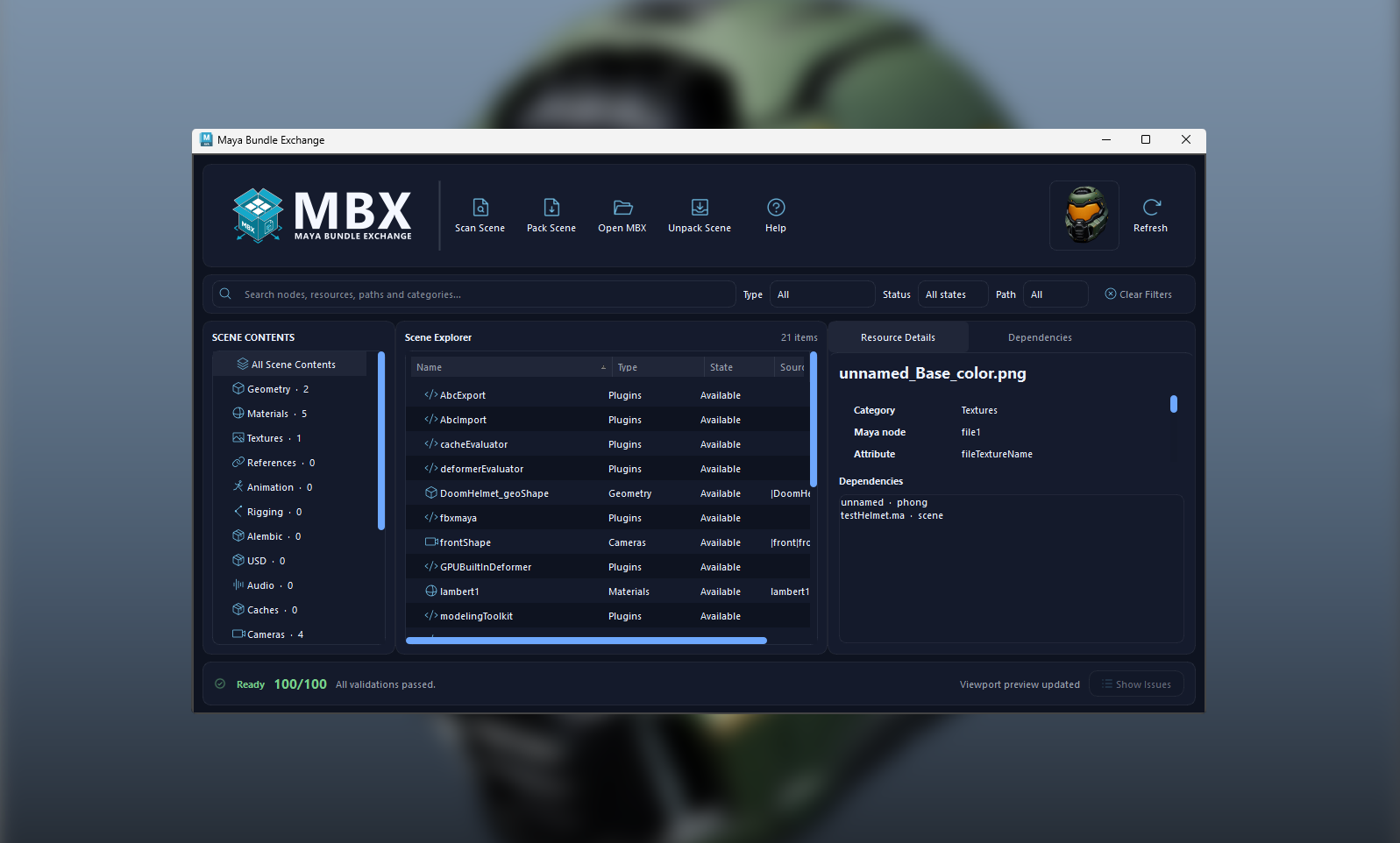
MBX Scene Explorer listing scene resources, dependency details and a portability scoreView dependency inspector ↗

Know what travels with the asset.

Open Advanced Package Settings for the Scene Explorer, missing-resource checks and a portability report. Inspect references, textures, caches and other detected files, then verify package integrity before a handoff.

Windows Explorer showing a helmet .mbx asset thumbnail, large preview and package metadataView Windows Explorer preview ↗

Find the right file before opening Maya.

With Windows integration enabled, .mbx files display their embedded thumbnails in Explorer. The registered Explorer property handler can also expose package metadata, as shown here. Open a package in the browser or add a copy to your library.

Before your first asset

A few useful details.

Is the complete MBX product free?

Yes. Maya Bundle Exchange is a free AO Studio Tools flagship. Sign in to your free account in AO.Hub and install it. The Asset Browser and packaging workflow do not require a paid plan.

Can I save one object instead of a complete scene?

Yes. Choose Add Selection as Asset for selected objects, or Add Current Scene as Asset for the whole scene. Add a preview and metadata, and save it as a new asset or a variant of an existing family.

What happens when I import or reference an asset?

MBX extracts the package into a managed local cache and restores resource paths before loading it into Maya. Import adds scene content; Reference creates a Maya reference to that extracted asset revision. To collect an opened MBX scene into a project folder, use Unpack Scene in Advanced Package Settings.

What is shared with the library, and what travels in an .mbx file?

The package carries the asset, its collected dependencies, preview and asset metadata, including tags and variant information. Team review notes and tag colors are stored alongside packages in the shared library folder. Favorites and recent history are local to each artist.

Does packaging include Maya or renderer plugins?

No. MBX collects detected external resources and reports dependency issues. The receiving workstation still needs a compatible Maya installation and the plugins or renderers used by the asset. Windows Explorer previews apply to .mbx packages with embedded previews.

The complete asset workflow

Create. Organize. Place. Share.

01 · CreateSave a selection or scene, or migrate existing MA, MB and FBX files into assets with previews and collected resources.
02 · OrganizeChoose categories, add tags and group variants. Find assets through search, favorites and visual previews.
03 · PlaceSelect a variant, choose Import or Reference and drag it into the Maya viewport.
04 · ShareExport the portable .mbx asset or work from a shared library, then reuse it in the next project.

Start your Maya asset library. Free.

MBX is an AO Studio Tools flagship, included with your free account. Download AO.Hub, sign in and install Maya Bundle Exchange. Open the Asset Browser and save your first asset.

Maya 2025 and 2026 · Free account required · No paid plan or credit card needed. Windows Explorer integration is Windows-only.